Arabic Sandbox
An interactive sandbox for exploring Arabic grammar through hands-on experimentation. Includes guided walkthroughs, vocabulary, examples, and tools that demonstrate how grammatical rules shape words and sentences.
The Problem
Learning Arabic grammar involves understanding how verb endings, sentence structure, and verb forms work together. As well as how they impact meaning. There are a plethora of resources available for people to learn this but I wanted to create a sandbox to experiment with the language and see its rules in action.
The goal was to create a platform that supports hands-on learning while also serving as a teaching tool for Arabic instructors. The block-based approach would allow learners to build and modify sentences, while giving teachers a way to demonstrate grammatical relationships and explain how each change affects structure and meaning.
The Solution
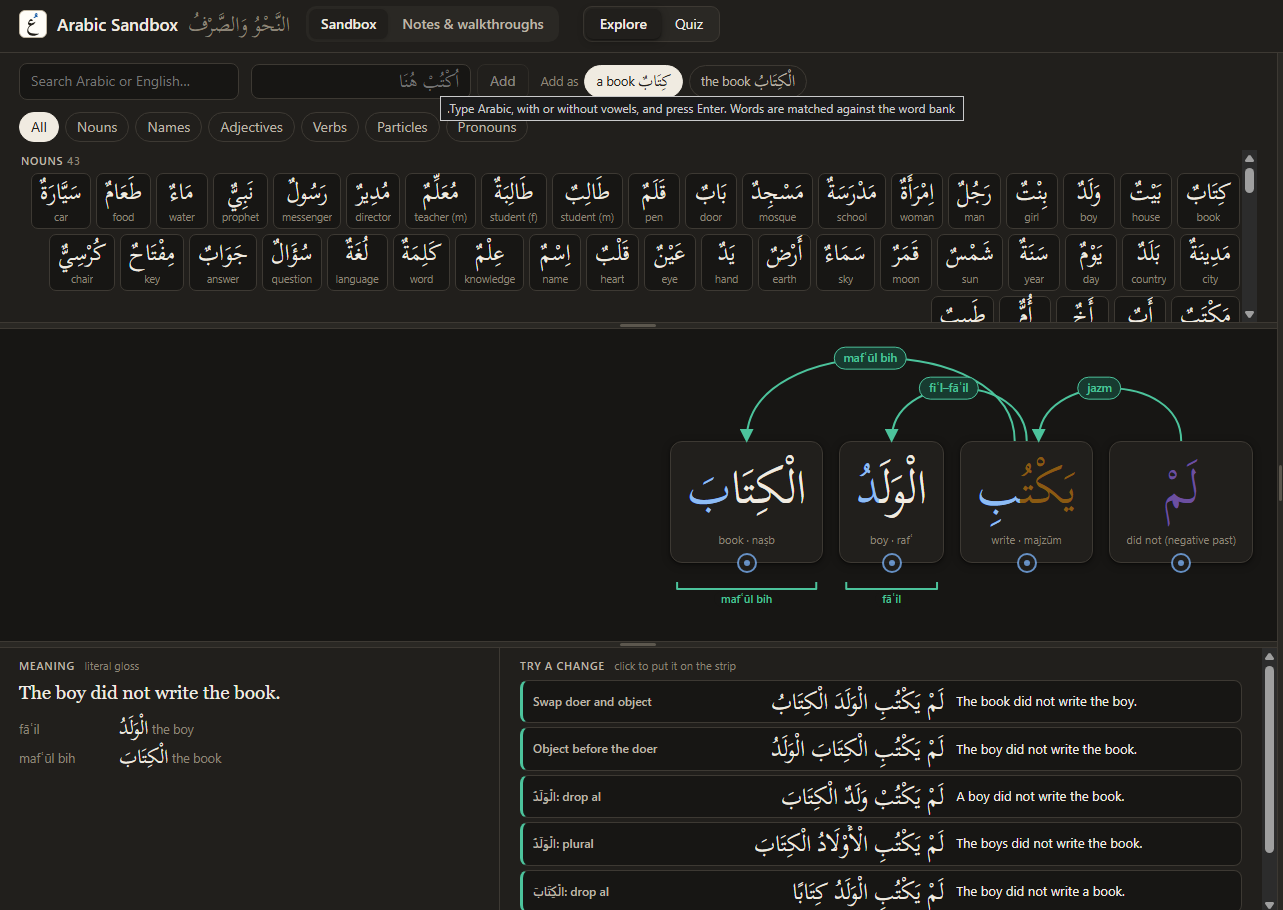
This tool is an interactive environment for practicing Arabic grammar and word formation. Users can build their own sentences from word blocks, connect grammatical relationships, and receive feedback explaining the results. You can also see alternative possibilities in meaning for your sentence.
The tool includes walkthroughs, vocabulary lists, conjugation tables, and a quiz mode. The idea is that the more you play with the tool, the stronger your understanding will be of Arabic grammar rules. This app is an accessory to learning.
The Outcome
The result is a working sandbox that brings grammar reference material and hands-on practice into one environment. I’ve received positive feedback from people studying Arabic who see it as a useful way to explore grammatical concepts and support their learning.
How To Use:
- Start with an example: Open the Examples menu to load a sentence, or add words from the word bank to build your own.
- Connect the words: Drag the dot beneath one word onto another and choose a grammatical relationship, such as subject–verb, possession, or noun–adjective.
- Explore the feedback: In Explore mode, watch supported word forms and endings change to match the relationships you create. Select a word to see its grammatical details and explanations.
- Experiment with meaning: Read the Meaning panel, then use Try a change to explore variations and see how they affect the sentence.
- Test your understanding: Switch to Quiz mode, choose the word endings yourself, and press Check for feedback explaining the relevant rules.
- Follow a walkthrough: Open Notes & walkthroughs for guided exercises and reference material. Teachers can also use the examples to demonstrate rules and work through changes with students.